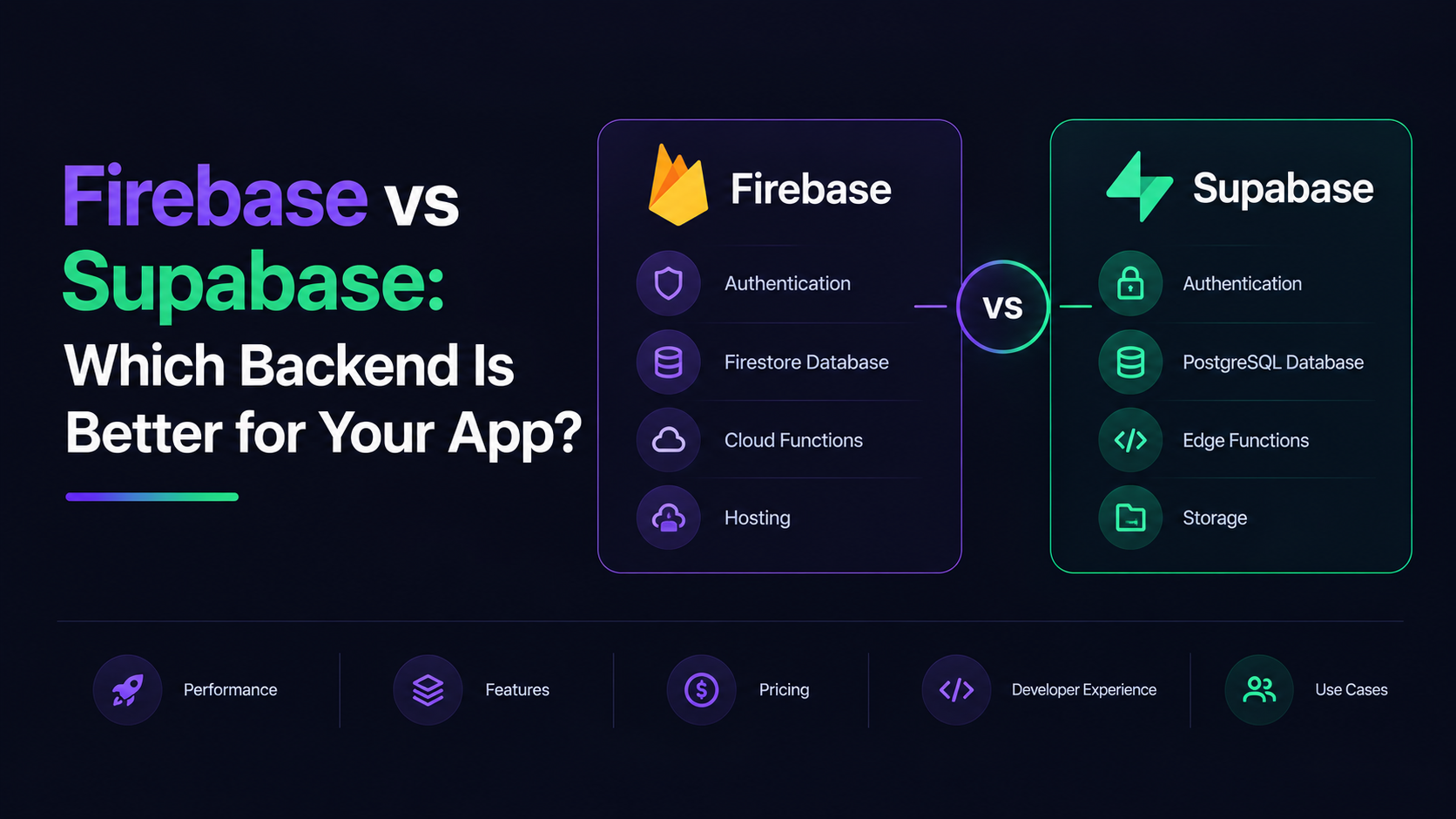
Firebase vs Supabase: Which Backend Is Better for Your App?
The Real Question You're Asking
You've built something impressive—a prototype, an MVP, maybe a growing user base. Now you're at a crossroads: Firebase or Supabase? Both are Backend-as-a-Service (BaaS) platforms that promise to eliminate server management headaches. But they solve the problem in completely different ways, and choosing the wrong one could cost you thousands or force a painful migration down the road.
This article cuts through the marketing speak and digs into what actually happens when you go to production with each platform. I'm sharing concrete cost comparisons, technical tradeoffs, and real scenarios so you can make an informed decision for your specific use case.
The Philosophical Divide: SQL vs NoSQL Architecture
Before diving into features, you need to understand the fundamental architectural difference. This isn't just a technical detail—it shapes every decision you'll make later.
Firebase: Document-Oriented NoSQL
Firebase is built on Firestore, a NoSQL document database. Think of it like a massive filing cabinet where each file (document) contains whatever data you want, in whatever structure you want. There's no enforced schema, no relationships, no joins.
How it feels to build:
- You create collections (like folders) and throw documents in them
- Each document is a JSON object with arbitrary fields
- To fetch related data, you make multiple queries and stitch them together in your app code
- Zero schema friction at the start—build fast, validate assumptions quickly
The tradeoff: This flexibility comes with a cost. Firestore charges per document read—one poorly designed query can multiply costs dramatically. For a SaaS with 50K users, Firebase typically costs $400-$800/month while Supabase typically costs $100-$200/month.
Supabase: Relational PostgreSQL
Supabase is built on the traditional relational database PostgreSQL. You define a schema upfront, use foreign keys to link tables, and write SQL queries.
How it feels to build:
- You create tables with defined columns and types
- Relationships are explicit and enforced by the database
- A single SQL query can join multiple tables and fetch complex data structures
- Some friction upfront designing the schema, but it pays dividends later
The advantage: Firestore creates architectural headaches. Consider a project management SaaS: in PostgreSQL (Supabase), you fetch all tasks for a user's projects with one SQL query and two joins. In Firestore, you need multiple sequential reads: one to get teams, one per team to get projects, one per project to get tasks. Each read costs money.
[TABLE SUGGESTION: Comparison of data modeling approach—Supabase SQL vs Firebase NoSQL with examples showing reads required for the same query]
Technical Differences That Actually Matter
Database Capabilities
Supabase (PostgreSQL):
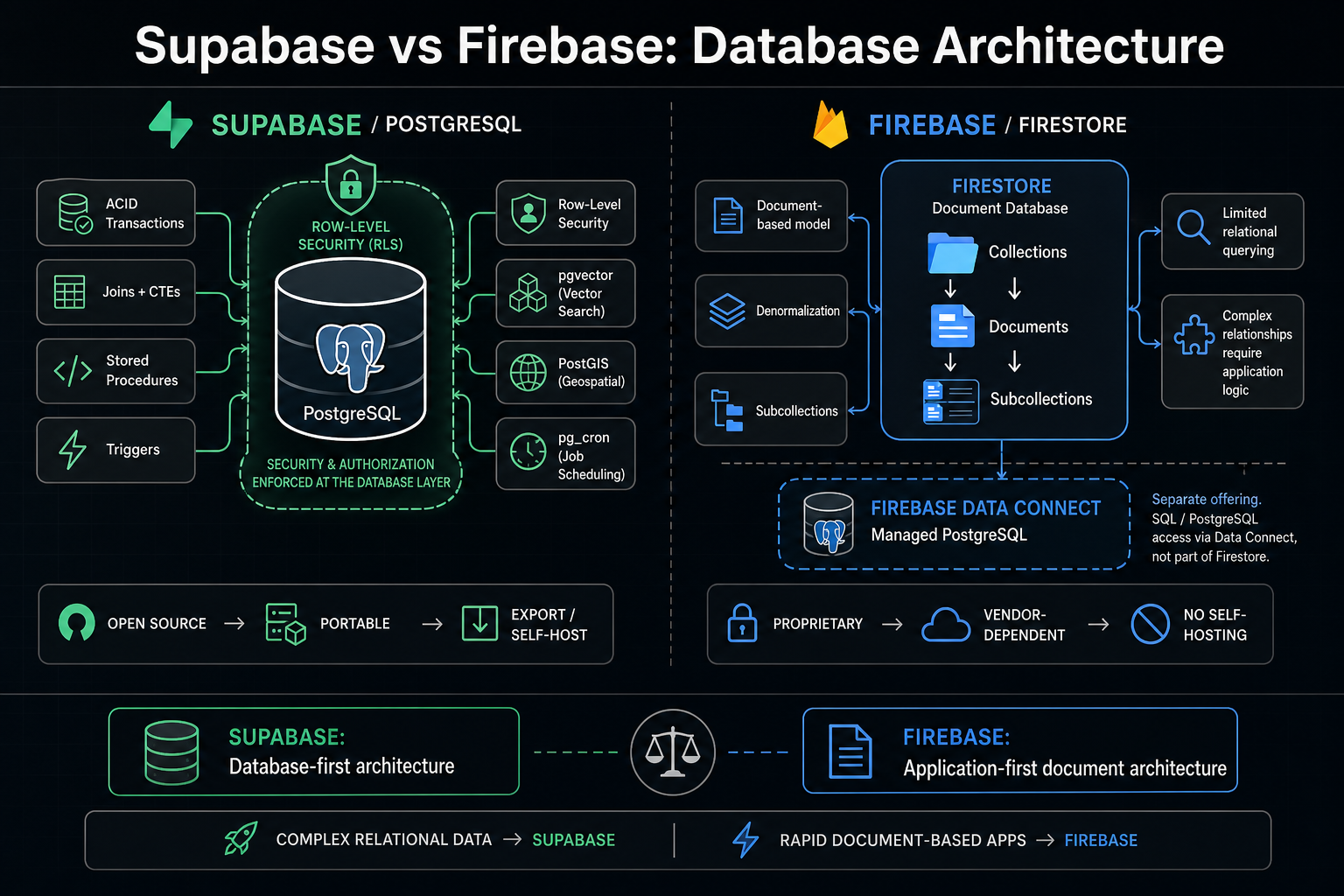
- Full ACID transactions, joins, CTEs, stored procedures, triggers
- Row-Level Security (RLS) enforced at the database layer—your auth logic lives in the database, not scattered across your app
- Extension ecosystem: pgvector for AI embeddings, PostGIS for geospatial queries, pg_cron for scheduled jobs
- Open-source, portable—you can export your data and run it anywhere
Firebase:
- Firebase launched Data Connect in 2024, a managed PostgreSQL backend with a GraphQL-like query layer—its first SQL offering, directly answering the comparison. But it's a separate product with its own learning curve
- Firestore uses subcollections and denormalization for relationships
- No built-in support for complex transactions across documents
- Proprietary—data export requires careful planning, self-hosting isn't an option
Real-Time Capabilities
Both platforms support real-time subscriptions, but differently.
Firebase: Firestore's real-time listeners are battle-tested and exceptional. If you're building a chat app, collaborative editor, or live dashboard, Firestore's subscriptions handle the hard problems (reconnection, batching, offline sync) elegantly. Firebase leads in real-time sync, maturity, and scalability.
Supabase: Supabase added real-time subscriptions via PostgreSQL logical replication. It works well for most use cases, but if you need complex offline-first sync (like mobile apps with poor connectivity), Firebase's approach is more battle-tested.
Authentication & Authorization
Firebase Auth:
- Email/password, Google, Facebook, Apple, GitHub, Microsoft, phone auth, anonymous auth
- Deep Google Cloud integration
- Magic link and passwordless flows
- Limited row-level access control—you enforce permissions in your app code or Cloud Functions
Supabase Auth:
- Email/password, Google, Apple, GitHub, Azure, Keycloak, and 20+ OAuth providers
- Row-Level Security (RLS) at the database layer—define who can access which rows, and the database enforces it
- Phone auth and passwordless flows
- More secure by default because authorization isn't an afterthought
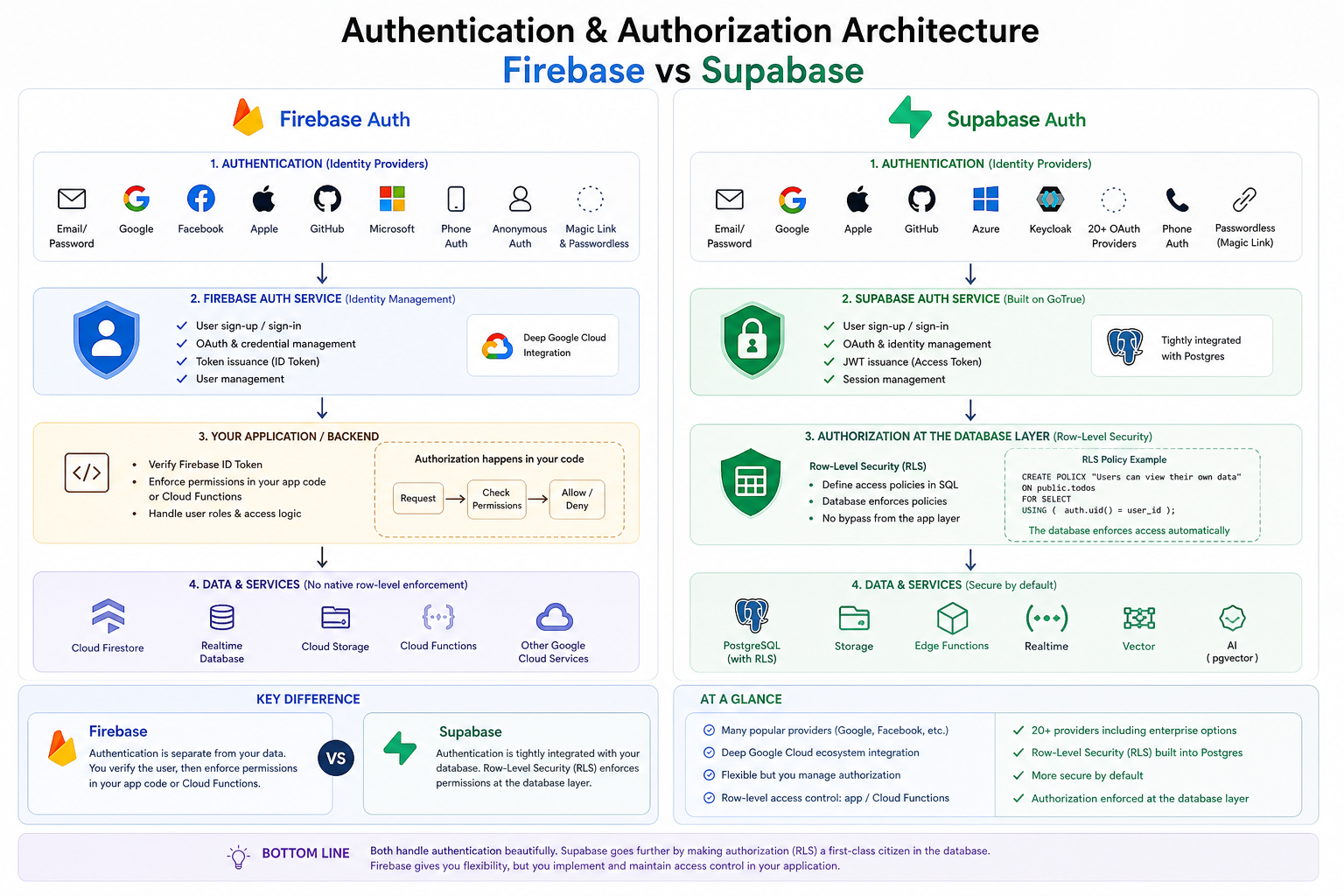
Firebase Auth vs Supabase Auth
Serverless Functions
Firebase Cloud Functions:
- Built-in, tightly integrated with other Firebase services
- Automatic scaling, pay-per-invocation
- Vendor lock-in—you write JavaScript/TypeScript in Google's runtime
Supabase Edge Functions:
- Supabase shipped background Edge Functions by Q1 2026, allowing asynchronous, long-running tasks
- Runs on Deno (V8 JavaScript runtime), more portable than Firebase
- Can be self-hosted if you self-host Supabase
The Cost Breakdown: Where Decisions Get Real
This is where the architectural differences create massive practical impact.
Firebase Pricing Model
Firestore Standard edition costs: reads $0.03/100K, writes $0.18/100K, deletes $0.02/100K, storage $0.18/GiB-month, egress $0.12/GiB.
The catch: You're billed per operation. Every document you read, write, or delete costs money.
Real-world example: Imagine you build a SaaS with 10,000 daily active users. Each user loads their dashboard (100 document reads), sends a message (2 writes), and refreshes the feed 5 times (500 reads). That's roughly 6 million reads and 20,000 writes per day.
- 6M reads: (6,000,000 ÷ 100,000) × $0.03 = $1.80/day
- 20K writes: (20,000 ÷ 100,000) × $0.18 = $0.036/day
- Storage (if using 5GB): 5 × $0.18 = $0.90/day
- Total: ~$2.74/day = $82/month
But here's the danger: If your app loads a list of 500 items every time a user opens the page, that is 500 reads per page load. With 10,000 daily active users opening the page twice per day, that is 10 million reads per day—9,950,000 billable reads = $5.97/day = $179/month from a single poorly designed query.
One inefficient query can double your bill without warning.
Supabase Pricing Model
Supabase free tier supports up to 50,000 monthly active users and 500MB of database storage. Pro plan costs $25/mo with resource-based pricing instead of per-operation.
The advantage: You pay for capacity (storage, compute), not usage.
Same scenario: 10,000 daily active users with the same query patterns. On Supabase Pro ($25/month), you're done. No per-operation charges.
If you need more capacity (CPU, RAM, bandwidth), you upgrade to Team ($599/month) or self-host.
Cost Comparison at Scale
Scenario Firebase Supabase Advantage Small app (< 1,000 DAU) ~$5-10/month $0-25/month Supabase free tier Growing SaaS (10,000 DAU) $150-400/month $25/month (flat) Supabase 6-16x cheaper Established app (50,000 DAU) $500-1,500/month $25-599/month (depending on capacity) Supabase 2-5x cheaper High-traffic app (500,000 DAU) $5,000-15,000/month $599-2,000/month (self-hosting option) Supabase significant savings + exit strategy
At the write-heavy end, Supabase handles 5,000 writes per second on a Micro instance ($25/mo tier), while Firebase caps at around 2,000 writes per second before per-operation overage charges escalate costs.
The Hidden Costs
Firebase:
- Cloud Storage requires upgrading from Spark to Blaze plan (pay-as-you-go)
- Network egress charges compound at scale ($0.12/GB is significant when serving global users)
- No hard spending cap—a viral moment or buggy listener could cost you thousands
Supabase:
- If self-hosting, you manage infrastructure ($200-400/month on AWS/GCP/DigitalOcean)
- Team plan ($599/month) jumps significantly from Pro ($25/month)
- No egress charges, but some users find the storage limits of Pro tier restrictive
Which Platform Wins in Real Scenarios?
Choose Firebase If:
- You're building a mobile app with offline-first sync
- Mobile apps frequently lose connectivity. Firebase's offline sync and conflict resolution is exceptional.
- Supabase is catching up, but Firebase is battle-tested here.
- Your team is deeply in the Google ecosystem
- You already use Google Cloud, Workspace, Android Studio, Flutter.
- Firebase integrations are seamless; the learning curve is shorter.
- You need to ship an MVP in days, not weeks
- Firestore's schema-less design lets you iterate without migrations.
- Firebase's documentation and community are massive (210,000+ GitHub stars, 50,000+ Stack Overflow questions).
- You're building a real-time collaboration app (Figma-style)
- Firestore's real-time listeners and offline sync are purpose-built for this.
- You can optimize your data model and accept the per-operation costs.
- Your queries are predictable and well-defined
- If you can design your Firestore structure to minimize reads, Firebase can be cost-effective.
- Not all apps are query-heavy; chat and notification apps work great here.
Choose Supabase If:
- Your data is relational and complex
- User → Teams → Projects → Tasks. Multiple joins. Supabase excels here.
- You'll save money and architectural headaches with SQL.
- You want predictable, flat pricing
- You prefer knowing your monthly costs upfront rather than watching operational metrics.
- Your finance team will love the flat tiers.
- You're building a SaaS with tens of thousands of users
- Per-operation pricing doesn't scale. Supabase's flat tiers stay affordable as you grow.
- For a SaaS with 50K users, Supabase typically costs $100-$200/month compared to $400-$800/month on Firebase.
- You want an exit strategy
- Supabase is fully open-source (Apache 2.0) and self-hostable. Firebase is proprietary and locked to Google Cloud.
- If your database grows beyond managed cloud costs, you can self-host PostgreSQL.
- You need Row-Level Security enforced by the database
- Multi-tenant SaaS apps need bulletproof authorization.
- Supabase's RLS means permissions are enforced at the database layer, not your app code.
- You're using AI features
- Supabase ships PostgreSQL extensions including pgvector for AI embeddings.
- Building RAG (Retrieval-Augmented Generation) pipelines is native to Postgres; Firebase requires workarounds.
The Migration Question: Can You Switch Later?
This is the question that keeps founders up at night: "If I choose wrong, how bad is the migration?"
Firebase → Supabase
Difficulty: Medium
Why: Firebase's document structure doesn't map 1:1 to SQL tables. You'll need to redesign your data model.
Cost: Engineering time (1-2 weeks for a medium app), downtime risk, testing burden.
Silver lining: Auth migration is well-documented; Supabase has migration guides. The reverse (Supabase → Firebase) is harder because Firebase has fewer query capabilities.
Supabase → Firebase
Difficulty: High
Why: You're moving from relational data (tables, joins) to denormalized documents. You'll need to rewrite significant application logic.
Cost: Significant engineering time, high risk of bugs, potential feature regressions.
Real impact: Most teams that start with Firebase for speed later find themselves migrating to Supabase as their app matures. In practice, many teams that start with Firebase for convenience later find themselves migrating to a SQL-based system as their app requirements grow.
Hybrid Approach: Firebase Data Connect
In 2024, Firebase launched Data Connect, a managed PostgreSQL backend with a GraphQL-like query layer. This is Firebase's answer to Supabase—it adds SQL capability to Firebase's ecosystem.
Advantage: You get SQL from Google, integrated with Firebase's other services.
Disadvantage: It's a separate product with its own pricing and learning curve. You're paying for both Firestore and Data Connect capabilities. Supabase is simpler if you want PostgreSQL.
My take: Data Connect is useful if you're already invested in Firebase and desperately need SQL. If you're starting fresh and need SQL, Supabase is the cleaner path.
Performance & Scalability in the Real World
Firebase
- Can handle millions of concurrent connections (real-time listeners)
- Per-operation billing means costs scale with traffic, not with user growth alone
- Firebase leads in real-time sync, maturity, and scalability
- At extreme scale (100M+ events/day), teams often move data to BigQuery for analytics
Supabase
- Supabase handles 5,000 writes per second on a Micro instance ($25/mo tier)
- By Q1 2026, Supabase has amassed over 1.2 million active developer users and powers backends for growing SaaS companies
- As of 2026, Supabase powers thousands of production applications including funded SaaS companies handling millions of users. The platform passed SOC 2 Type II, has a real status page, daily backups on Pro, and Point-in-Time Recovery on Team plans
- For databases larger than 100GB, Team plan or self-hosting becomes necessary
Both platforms are production-ready at scale. The difference is cost and control, not capability.
Developer Experience & Learning Curve
Firebase
Pros:
- Incredibly easy to get started (5 minutes to first working backend)
- Unified documentation and SDKs across web, iOS, Android
- Strong community (lots of tutorials, Stack Overflow answers)
- Built-in observability and debugging tools
Cons:
- As your app grows, architectural problems become apparent
- Debugging cost explosions requires deep knowledge of Firestore access patterns
- Documentation is sometimes spread across multiple products (Firestore, Cloud Functions, Authentication)
Supabase
Pros:
- If you know PostgreSQL, you're immediately productive
- Cleaner mental model: standard Postgres + managed services on top
- Self-hosting is an actual option if you want to minimize costs
- Row-Level Security is a superpower once you understand it
Cons:
- Steeper learning curve if you don't know SQL
- Smaller ecosystem compared to Firebase (though growing fast)
- Less third-party library support (though improving)
- Cold starts on Edge Functions can be slower than Firebase Cloud Functions
Making Your Decision: The Checklist
Before committing, answer these questions:
- What's your data structure?
- Simple documents (chat, notifications, feeds) → Firebase
- Complex relationships (SaaS, accounting, CRM) → Supabase
- How many users will you have in year 1?
- < 10,000 → Either works; Firebase slightly faster to launch
- 10,000+ → Supabase likely cheaper and more sustainable
- How does your team prefer to think about databases?
- "Let me move fast and iterate" → Firebase
- "I know SQL and I like thinking in schemas" → Supabase
- What's your runway and risk tolerance?
- Limited runway, need to validate quick → Firebase MVP fast
- More breathing room, want to optimize for scale → Supabase
- VCs funding you → Supabase's predictable pricing is easier to explain
- Do you need an exit strategy?
- "I might self-host later" → Supabase
- "I'm all-in on managed services" → Either (Firebase simpler here)
- What's your authentication complexity?
- Simple (verify email, Google login) → Either works
- Complex (row-level permissions, multi-tenant isolation) → Supabase's RLS wins
The Verdict
For 2026 and beyond:
Supabase is the right call for most modern web applications. You get PostgreSQL (the most battle-tested database in the world), managed auth, storage, real-time, and Edge Functions—all built on one source of truth. Pricing is resource-based ($25/mo Pro) instead of per-operation, which means a successful app doesn't trigger a $5,000 surprise bill. And if your managed costs explode, you can self-host.
Firebase remains the right call for mobile-first apps with complex offline sync, teams already in Google's ecosystem, or hyper-fast prototyping. Firebase is better for speed, real-time apps, and rapid MVP development.
The bigger question isn't Firebase vs Supabase—it's whether you've thought deeply about your data structure before you start building. Most teams that regret their choice picked based on hype or speed alone, not based on their actual requirements.
Pick the platform that matches your data model and risk tolerance. Then build something great.
Resources
- Supabase Official Documentation — Comprehensive guides, API reference, and tutorials
- Firebase Official Documentation — Complete Firebase product documentation
- Bytebase Comparison: Supabase vs Firebase 2026 — Technical deep-dive updated annually
- Firebase Pricing Calculator — Estimate Firebase costs for your use case
- Supabase Pricing — Current Supabase pricing tiers and specifications
- PostgreSQL Documentation — The SQL standard reference
- Firebase Data Connect Documentation — Google's SQL alternative within Firebase
- Row-Level Security in PostgreSQL — Secure multi-tenant patterns with RLS
- Firestore Best Practices for Cost Optimization — How to avoid cost explosions on Firebase
- Supabase GitHub Repository — Open-source Supabase stack, 90K+ stars