Optimistic Updates in Frontend Development: Instant Feedback Without Waiting for the Server
A user clicks "Like" on a post. The heart icon fills instantly. Three seconds later, the server confirms the action completed successfully. That seamless experience? That's the magic of optimistic updates—a deceptively simple technique that makes your frontend feel faster, more responsive, and more polished than it actually is.
The Problem: Why Network Latency Matters
When users interact with your app, they expect instant feedback. A button press should feel immediate. A form submission should update the UI right now, not after a roundtrip to the server.
Here's the reality: network requests take time.
Even in ideal conditions—fiber internet, low-latency servers—you're looking at 100-300ms minimum for a roundtrip request. Add mobile users, international audiences, or peak server load, and that delay stretches to 1-2 seconds or more. During that time, users see nothing. No loading state, no confirmation, no sense that their action registered.
This creates a terrible user experience: users feel unsure whether their action worked, they might click again, or they abandon the action entirely thinking something broke.
This is where optimistic updates come in.
What Are Optimistic Updates?
Optimistic updates are a frontend pattern where you assume the server request will succeed, update your UI immediately, and then handle the response (or failure) when it arrives.
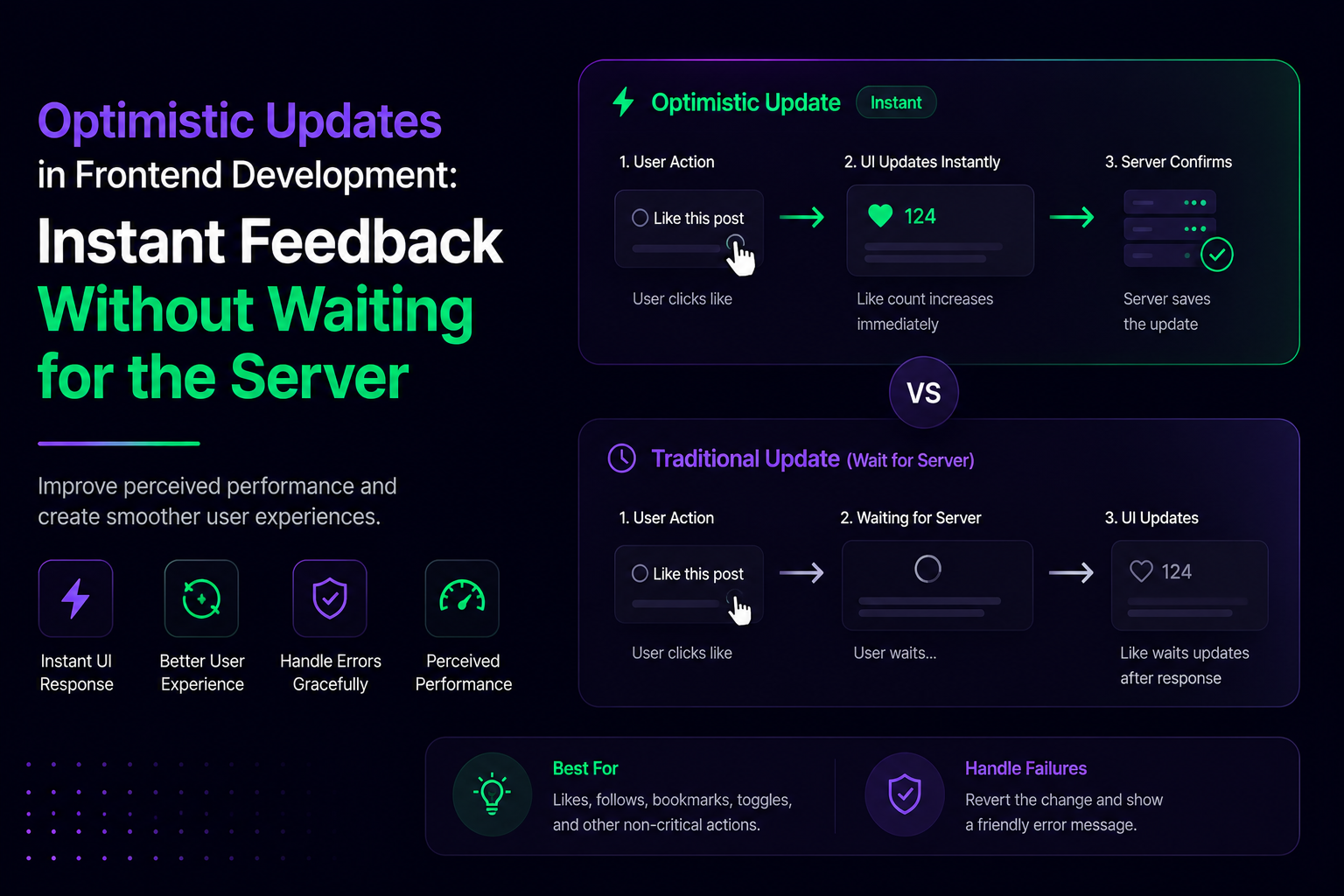
Without optimistic updates:
- User clicks "Like"
- Request starts (UI shows loading state)
- Wait for server response (500ms)
- Server confirms success
- UI updates with the new state
With optimistic updates:
- User clicks "Like"
- UI updates immediately to show the liked state
- Request starts in the background (user doesn't see loading)
- Server confirms success (or rollback if it fails)
The user perceives your app as instantly responsive, even if the server takes a full second to respond.
Why This Matters: The Psychology of Perceived Speed
Humans are impatient, especially with technology. A 200ms delay is barely noticeable. A 500ms delay feels sluggish. A 2-second delay feels broken.
Research on user experience and response time (dating back to Jakob Nielsen's work on usability) shows that perceived performance is often as important as actual performance. Optimistic updates exploit this: your actual backend might be the same speed, but users feel like your app is 5-10x faster.
This is why major apps use optimistic updates everywhere:
- Twitter/X: Retweets, likes, and follows update instantly
- Gmail: Messages appear in your inbox before the server confirms the save
- Figma: Collaborative edits appear immediately
- Notion: Page edits sync in real-time
These aren't faster servers—they're smarter frontends.
The Core Implementation Pattern
Here's the foundational pattern for optimistic updates. We'll use a "Like" button example:
1const [isLiked, setIsLiked] = useState(false);
2const [isPending, setIsPending] = useState(false);
3
4const handleLike = async () => {
5  // Step 1: Optimistic update (assume success)
6  const previousState = isLiked;
7  setIsLiked(!isLiked);
8  setIsPending(true);
9
10  try {
11    // Step 2: Make the request in the background
12    const response = await fetch(`/api/posts/${postId}/like`, {
13      method: 'POST',
14      body: JSON.stringify({ liked: !previousState })
15    });
16
17    if (!response.ok) {
18      // Step 3: Handle failure - rollback to previous state
19      setIsLiked(previousState);
20      toast.error('Failed to update like status');
21    }
22    // If successful, UI already reflects the correct state
23  } catch (error) {
24    // Network error - rollback
25    setIsLiked(previousState);
26    toast.error('Something went wrong');
27  } finally {
28    setIsPending(false);
29  }
30};
31
The pattern in three steps:
- Optimistic Update: Immediately update the UI to reflect what should happen
- Background Request: Send the request without blocking the user
- Rollback on Failure: If the server rejects, revert the UI to the previous state
This feels instant to the user, but safely handles failure cases.
Advanced Pattern: Handling Concurrent Requests
What happens if your user clicks "Like" twice before the first request completes? This gets tricky.
1const [likeCount, setLikeCount] = useState(5);
2const [pendingLikes, setPendingLikes] = useState(0);
3
4const handleLike = async () => {
5  // Increment optimistically
6  setLikeCount(prev => prev + 1);
7  setPendingLikes(prev => prev + 1);
8
9  try {
10    await fetch(`/api/posts/${postId}/like`, { method: 'POST' });
11    setPendingLikes(prev => prev - 1);
12  } catch (error) {
13    // Rollback only if we get an error
14    setLikeCount(prev => prev - 1);
15    setPendingLikes(prev => prev - 1);
16  }
17};
The key insight: track pending requests separately so you know which optimistic updates are still waiting for confirmation. This prevents the "flashing back and forth" when multiple requests are in flight.
The Risks: When Optimistic Updates Backfire
Optimistic updates aren't free. There are genuine trade-offs:
1. Inconsistent State (Temporary)
If the server fails silently or takes forever, your UI shows one thing and your database shows another. The moment the user refreshes, the illusion breaks.
Solution: Persist pending changes. When the app reloads, re-sync what the backend actually knows about.
2. Cascading Failures
If optimistic update A fails, and the user has already acted on that change (e.g., they liked a post, then commented on it), rolling back the like breaks the comment context.
Solution: Use transactions or ensure idempotency. Make operations safe to retry.
3. Confusing Error States
Users expect to see what went wrong. But with optimistic updates, by the time the error arrives, they've moved on to the next action. Errors get lost in the noise.
Solution: Show persistent error states. Use toast notifications that stay visible, or a dedicated error panel.
4. Over-Optimism on Unreliable Networks
On poor connections (3G, rural areas), optimistic updates fail more often. Users see their action succeed, then watch it rollback moments later. This feels broken.
Solution: Detect network quality. Disable optimistic updates or show a warning on slow connections.
[TABLE SUGGESTION: Comparison matrix of "When to Use Optimistic Updates" - rows: operation type (like/retweet, comment, file upload, payment), columns: network reliability, data consequence, recommended approach]
Real-World Implementation Strategies
Strategy 1: Optimistic Updates + Polling
Update optimistically, then poll the server to confirm the actual state:
1const handleUpdate = async (newValue) => {
2  setData(newValue);
3
4  try {
5    await fetch('/api/update', { method: 'POST', body: JSON.stringify(newValue) });
6  } catch (error) {
7    // Poll the server to get the true state
8    const actualState = await fetch('/api/data').then(r => r.json());
9    setData(actualState);
10  }
11};
This works well for simple state changes but adds server load with polling.
Strategy 2: Optimistic Updates + Server-Sent Events (SSE)
Push the true state back to the client in real-time:
1useEffect(() => {
2  const eventSource = new EventSource('/api/stream');
3  eventSource.onmessage = (event) => {
4    const actualState = JSON.parse(event.data);
5    setData(actualState); // Sync with server truth
6  };
7  return () => eventSource.close();
8}, []);
9
The server pushes confirmations or corrections as they happen. Better for high-frequency updates.
Strategy 3: Optimistic Updates + Request Deduplication
Queue requests and deduplicate them to prevent duplicate actions:
1const requestQueue = useRef(new Map());
2
3const handleAction = async (id, action) => {
4  const key = `${id}-${action}`;
5
6  if (requestQueue.current.has(key)) {
7    // Already pending, don't duplicate
8    return;
9  }
10
11  setUI(action); // Optimistic
12  requestQueue.current.set(key, true);
13
14  try {
15    await fetch(`/api/action`, { method: 'POST', body: JSON.stringify({ id, action }) });
16  } finally {
17    requestQueue.current.delete(key);
18  }
19};
20
Prevents the "double-click" problem where rapid clicks queue duplicate requests.
When NOT to Use Optimistic Updates
Optimistic updates aren't always the right choice. Be cautious with:
- Financial transactions: Don't optimistically update a payment until the bank confirms. The cost of rolling back outweighs UX gains.
- Destructive operations: Deleting data optimistically can feel good until the user sees it come back. Better to show a loading state.
- Security-sensitive actions: Two-factor authentication confirmations should wait for the server.
- Operations with side effects: If liking a post sends a notification, don't optimistically notify before the server confirms the like.
Rule of thumb: Use optimistic updates for reversible actions (like, comment, edit) where the cost of rolling back is low.
Tools & Libraries That Handle This
Several libraries abstract away the complexity:
- TanStack Query (React Query): Built-in optimistic update support via
useMutation - SWR:
mutate()with rollback patterns - Apollo Client:
optimisticResponseoption for GraphQL mutations - Remix: Form submissions with optimistic UI out of the box
- Next.js Server Actions: Handle this transparently
Example with TanStack Query:
1const mutation = useMutation({
2  mutationFn: (newValue) => fetch('/api/update', { method: 'POST', body: JSON.stringify(newValue) }),
3  onMutate: async (newValue) => {
4    // Cancel outgoing refetches
5    await queryClient.cancelQueries({ queryKey: ['data'] });
6    // Save previous state
7    const previousData = queryClient.getQueryData(['data']);
8    // Optimistic update
9    queryClient.setQueryData(['data'], newValue);
10    // Return for potential rollback
11    return { previousData };
12  },
13  onError: (err, newValue, context) => {
14    // Rollback
15    queryClient.setQueryData(['data'], context.previousData);
16  },
17});
These libraries handle the complexity of tracking pending requests, rollbacks, and race conditions so you don't have to reinvent the wheel.
Testing Optimistic Updates
Testing these patterns matters because race conditions are subtle bugs that happen in production, not development:
1describe('Optimistic Updates', () => {
2  it('should update UI immediately, then confirm with server', async () => {
3    render(<LikeButton postId="1" />);
4    const button = screen.getByRole('button', { name: /like/i });
5
6    // UI updates immediately
7    fireEvent.click(button);
8    expect(button).toHaveAttribute('aria-pressed', 'true');
9
10    // Server confirms
11    await waitFor(() => {
12      expect(fetchMock).toHaveBeen calledWith('/api/posts/1/like');
13    });
14  });
15
16  it('should rollback if server fails', async () => {
17    fetchMock.mockRejectedValueOnce(new Error('Server error'));
18    render(<LikeButton postId="1" />);
19
20    fireEvent.click(screen.getByRole('button', { name: /like/i }));
21
22    await waitFor(() => {
23      expect(screen.getByRole('button')).toHaveAttribute('aria-pressed', 'false');
24      expect(screen.getByText(/something went wrong/i)).toBeInTheDocument();
25    });
26  });
27});
Write tests that verify:
- Immediate UI update
- Correct rollback on failure
- No duplicate requests on rapid clicks
- Proper error messaging
Key Takeaways
- Optimistic updates make apps feel faster by updating the UI before the server responds
- The pattern is simple: update UI → make request → rollback on failure
- Trade-offs matter: only use them for reversible, low-consequence actions
- Use libraries like TanStack Query to avoid reimplementing the complex edge cases
- Test thoroughly because race conditions are subtle and happen in production
- Monitor your actual users to see if optimistic updates actually improve perceived performance in your target markets
Optimistic updates won't make your server faster, but they'll make your users feel like it is. And in UX, perception is reality.