Streaming UI Explained: The Modern Way to Build Fast Interfaces
Traditional server-side rendering (SSR) has a fatal flaw: buffering.
The server waits for ALL data before sending ANY HTML. If your page has:
- Header (50ms)
- Navigation (100ms)
- Product list (800ms) ← Slowest
- Recommendations (300ms)
The user waits 800ms for a blank page, even though 3/4 of the content could appear in 100ms.
This is the buffering problem. The slowest request holds everything hostage.
Result: Poor Core Web Vitals, high bounce rates, users think the page is broken.
Streaming changes this entirely.
What Is Streaming UI?
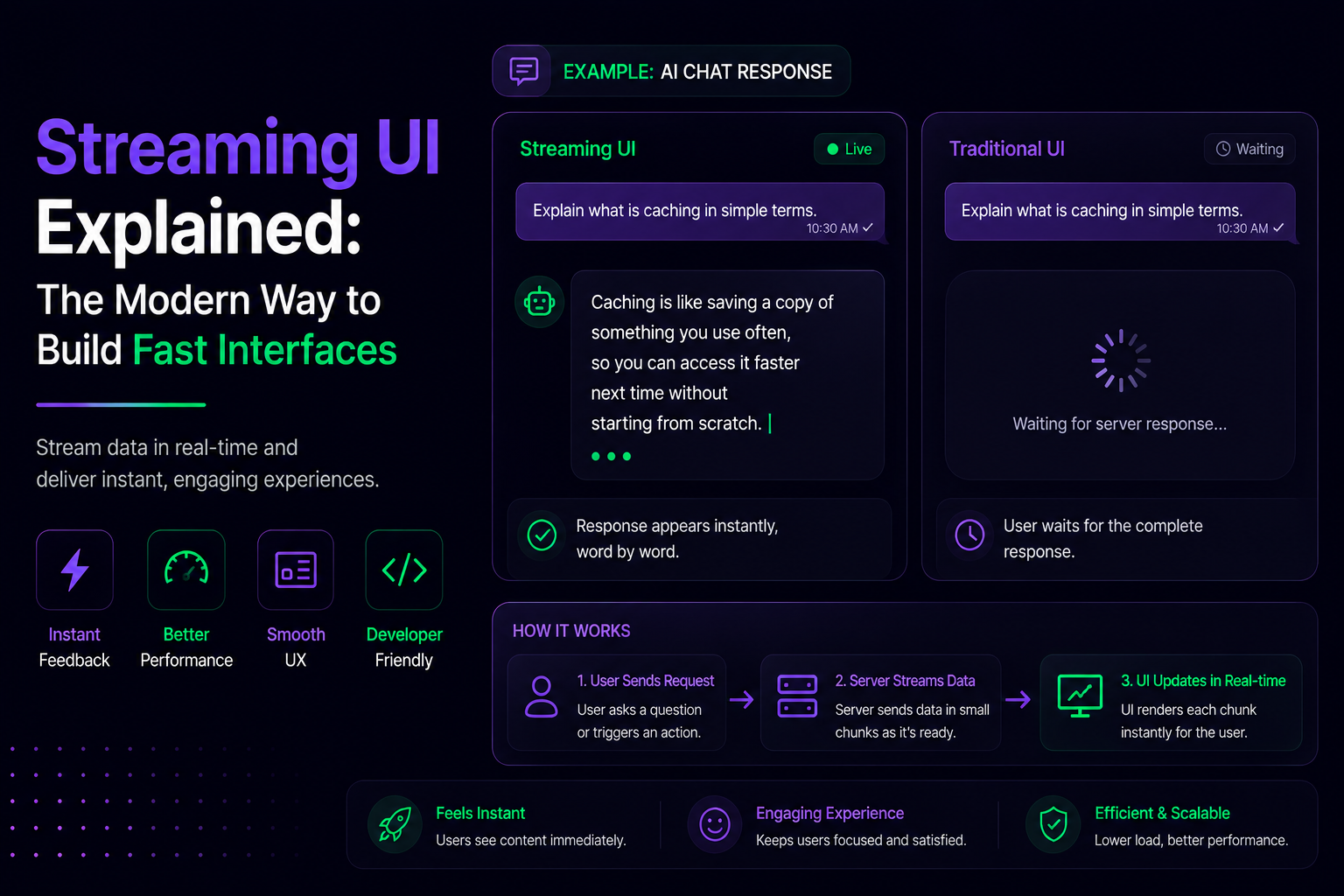
Streaming sends HTML to the browser as it becomes available, not after everything is ready.
Old way:
[Wait 800ms for all data] → [Send complete page] → [Browser renders]
Streaming way:
[Send shell in 100ms] → [Stream data chunks as ready] → [Browser renders progressively]
Users see content immediately while slower parts load in the background.
How It Works: The Static Shell Pattern
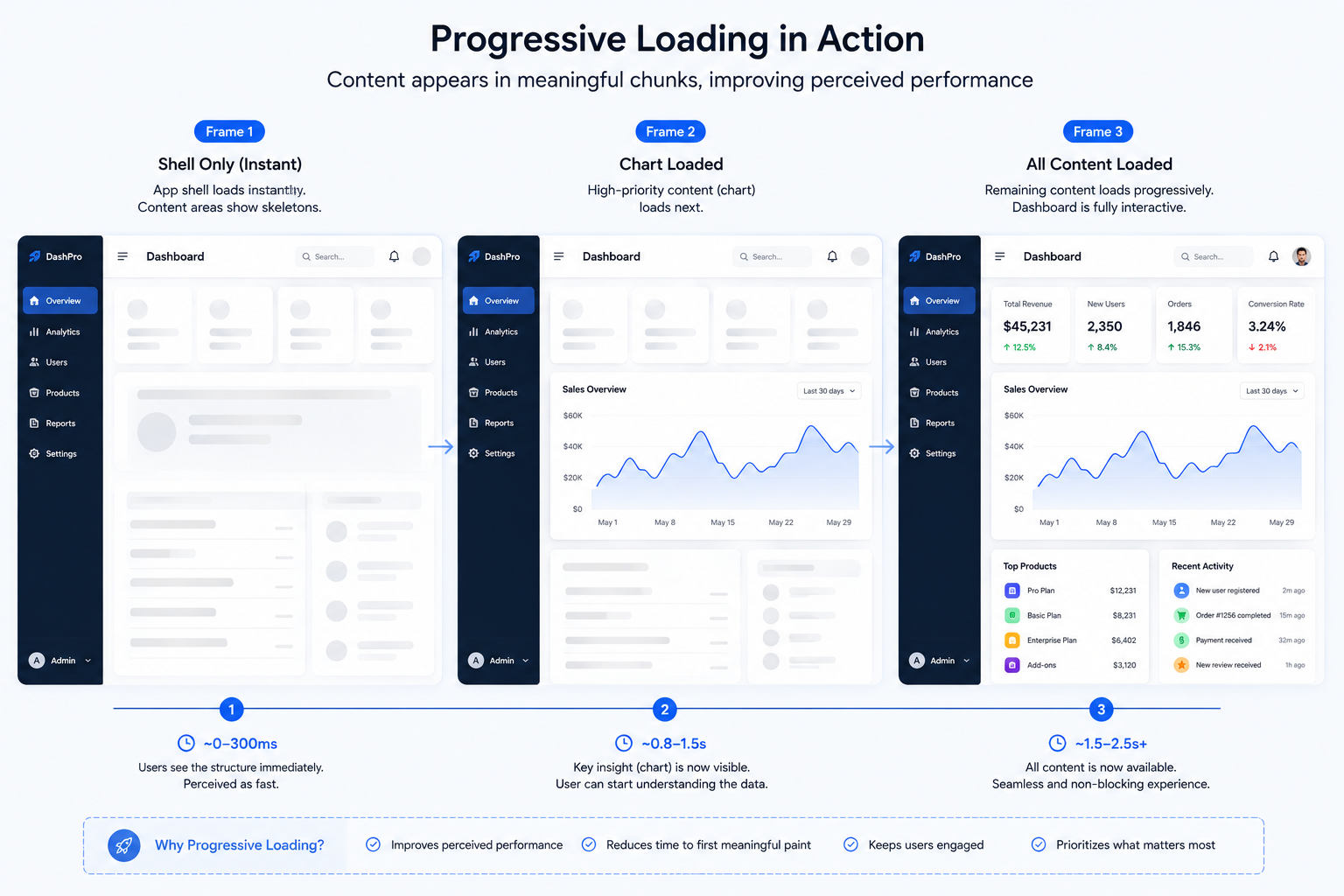
The server sends the shell (header, navigation, layout chrome) immediately. Slow parts wrapped in <Suspense> stream in as later chunks of the same HTTP response, each replacing a fallback that was already visible.
Example: Analytics Dashboard
1export default function Dashboard() {
2  return (
3    <div>
4      <Header /> {/* ✅ Sends immediately (~100ms) */}
5      <Suspense fallback={<MetricsSkeleton />}>
6        <Metrics /> {/* ⏳ Streams when ready (~800ms) */}
7      </Suspense>
8      <Suspense fallback={<ChartSkeleton />}>
9        <Chart /> {/* ⏳ Streams when ready (~500ms) */}
10      </Suspense>
11    </div>
12  );
13}
What users see:
- At 100ms: Shell + two loading skeletons
- At 500ms: Chart appears
- At 800ms: Metrics appear
Page feels useful at 100ms, not after 800ms.
Two Levels of Streaming
1. Server-Side Streaming (React 18+)
React provides two APIs: renderToPipeableStream for Node.js environments and renderToReadableStream for Edge runtimes (Cloudflare Workers, Vercel Edge, Deno). Each sends HTML in chunks as components render.
Next.js handles this automatically:
1// app/dashboard/page.js
2import { Suspense } from 'react';
3
4export default function Page() {
5  return (
6    <>
7      <Header /> {/* Instant */}
8      <Suspense fallback={<Skeleton />}>
9        <SlowComponent /> {/* Streams */}
10      </Suspense>
11    </>
12  );
13}
14
15async function SlowComponent() {
16  const data = await fetch('...', { cache: 'no-store' });
17  return <Dashboard data={data} />;
18}
19
No manual API calls needed—Next.js streams automatically.
2. Progressive Hydration (The Missing Half)
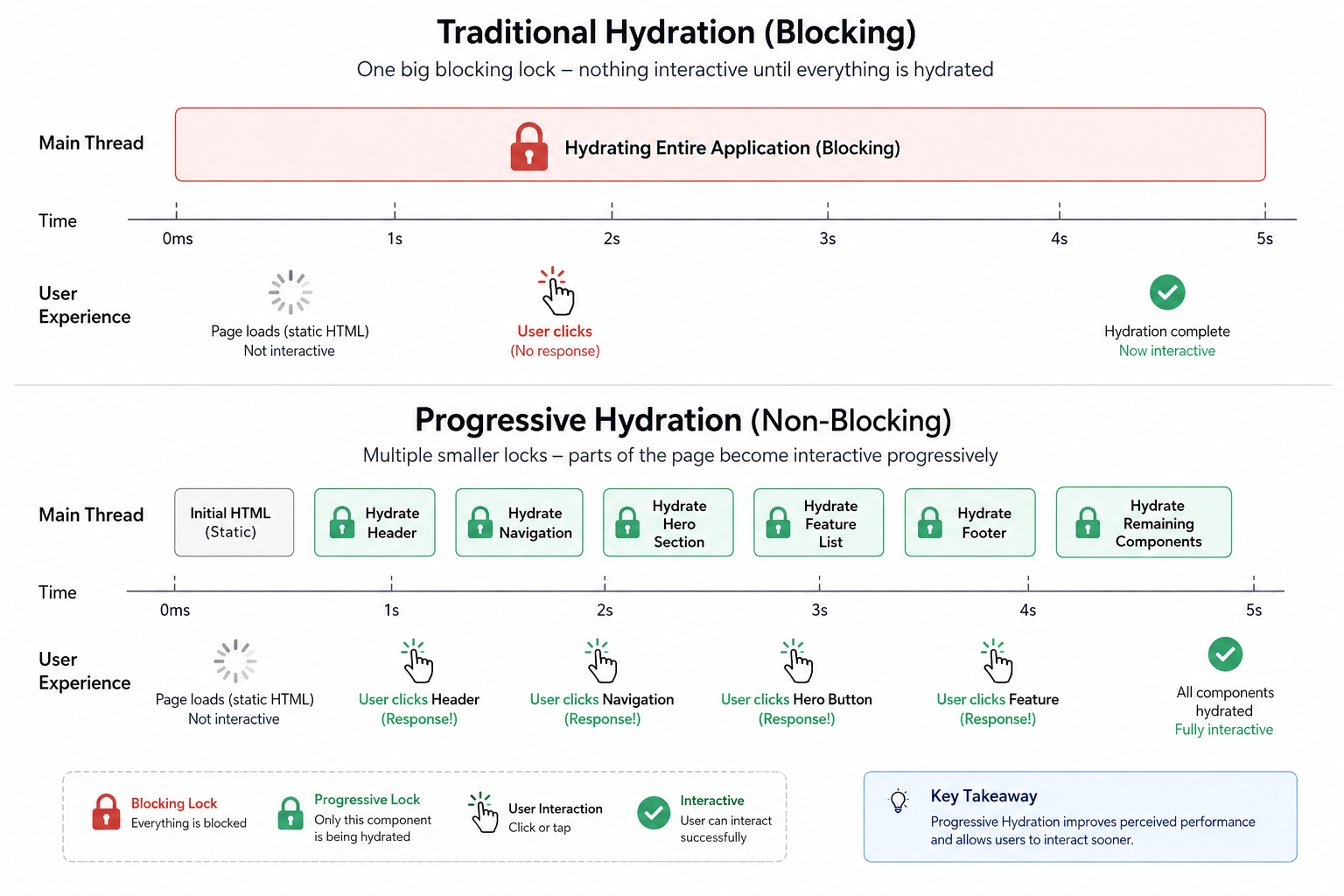
Streaming gets HTML to the browser fast, but there's a second problem: hydration. Traditional hydration hydrates the entire page at once, blocking the main thread. Progressive hydration hydrates interactive chunks as soon as they arrive, reducing idle time.
Example: A page hydrates critical navigation instantly, but defers less-important regions (chat widget, recommendations).
With progressive hydration, if a user clicks in a region that hasn't hydrated yet, React reprioritizes—that region jumps the queue.
Result: Users interact with the page sooner, not after waiting for everything to hydrate.
Hydration sequence
Next-Level: Partial Prerendering (PPR)
PPR is the future of streaming UI. It solves the streaming + static trade-off entirely.
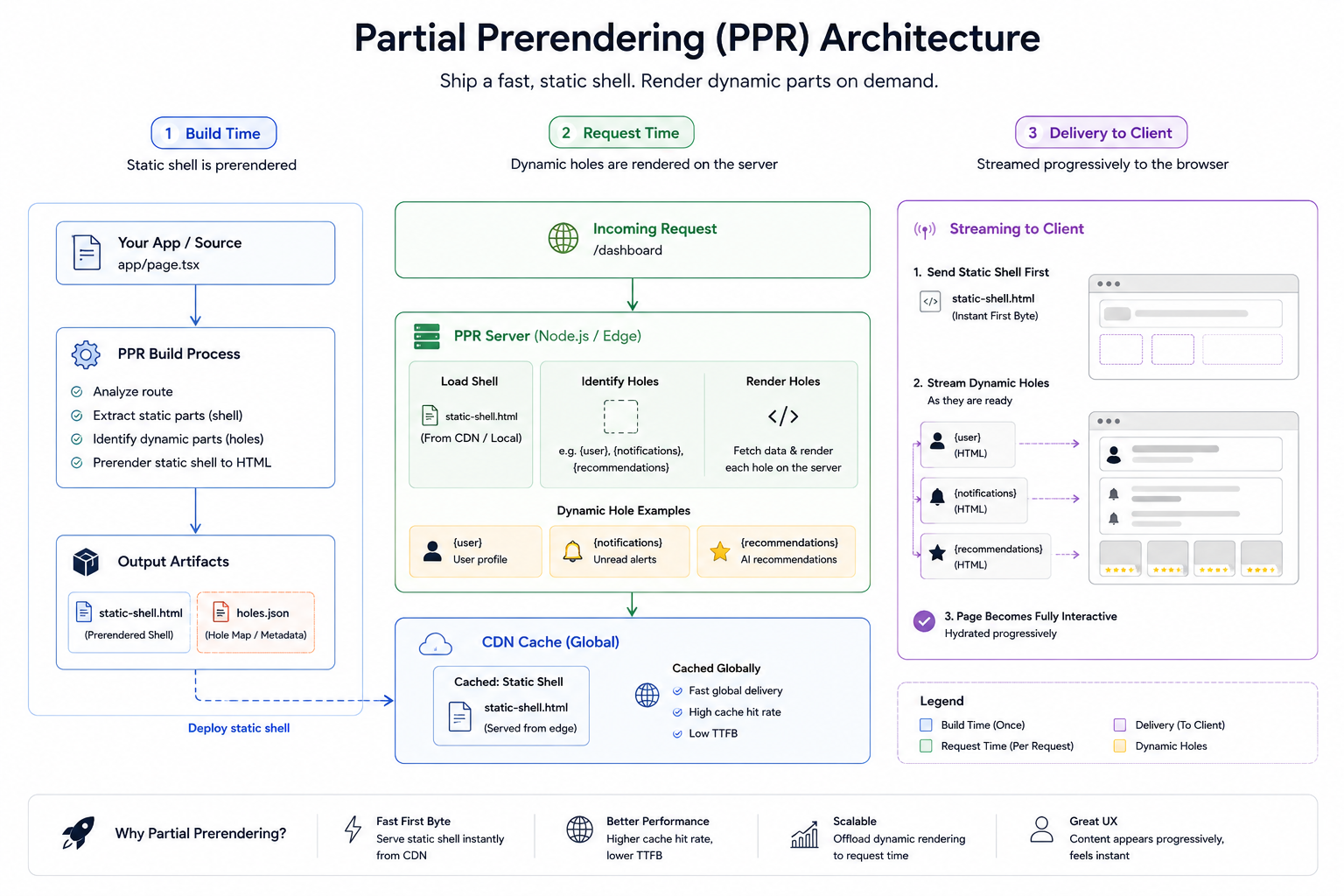
Partial Prerendering (PPR) combines static and dynamic content in the same route. At build time, Next.js generates a static HTML shell and stores dynamic sections for streaming at request time.
The magic: Static parts are prerendered at build time and cached on the CDN. Dynamic parts stream at request time.
1// app/products/[id]/page.js
2import { Suspense } from 'react';
3
4export default async function Product({ params }) {
5  return (
6    <>
7      <ProductHeader id={params.id} /> {/* Static, cached on CDN */}
8      <ProductImage id={params.id} /> {/* Static, cached on CDN */}
9
10      <Suspense fallback={<ReviewsSkeleton />}>
11        <Reviews id={params.id} /> {/* Dynamic, streams on request */}
12      </Suspense>
13
14      <Suspense fallback={<RecSkeleton />}>
15        <Recommendations id={params.id} /> {/* Dynamic, streams on request */}
16      </Suspense>
17    </>
18  );
19}
What happens:
Request Shell Source Streaming Result User 1 CDN (instant) Reviews + Recommendations ~50ms TTFB User 2 CDN (instant) Reviews + Recommendations ~50ms TTFB User 3 CDN (instant) Reviews + Recommendations ~50ms TTFB
Every user gets CDN speed for the static shell, then personalized content streams in.
PPR offers a unified model blending the reliability and speed of Incremental Static Regeneration (ISR) and the dynamic capabilities of Server-Side Rendering (SSR).
Status: PPR became stable in Next.js 16 (October 2025) as part of Cache Components. Use it now.
Error Handling: The Critical Missing Piece
With streaming, errors are tricky. Once the shell flushes, you can't change the HTTP status code. Your only option is to replace the affected region with a fallback.
Pattern: Error Boundary + Suspense
1<ErrorBoundary fallback={<ReviewsError />}>
2  <Suspense fallback={<ReviewsSkeleton />}>
3    <Reviews productId={id} />
4  </Suspense>
5</ErrorBoundary>
Wrap each streaming region in both an error boundary (for "loaded, but failed") and a suspense boundary (for "still loading").
Without this, errors silently disappear or hydration fails.
Real Performance Gains
Based on <cite index="1-1">research on streaming implementations, LCP improves dramatically while total load time stays similar</cite>:
Metric Traditional SSR Streaming SSR Gain TTFB 800ms 100ms 87% faster LCP 2.8s 0.6s 78% faster Time to Interactive 4.2s 1.8s 57% faster Total Time 4.2s 4.3s ~same Perceived Speed Slow 14x faster ⭐
Key insight: Total time barely changes, but users perceive the page as dramatically faster because they see something within 100ms instead of waiting 800ms.
When to Use Streaming (Not Always)
✅ Best for:
- Dashboards with slow queries
- E-commerce product pages (static: images/price, dynamic: reviews/inventory)
- Content sites with external data (articles + comments)
- Multiple independent data sources
❌ Skip if:
- Single slow query (nothing overlaps)
- 100% personalized (user dashboard, account settings)
- Everything is static
- Page changes on every request (live dashboards)
Critical Production Gotchas
1. Can't Change Status Codes After Shell Flushes
Once the first chunk sends, the HTTP status is locked at 200. You can't trigger a 404 or redirect in a streamed response after the shell has flushed. If a deeper component would have triggered an error, you can render an in-band error message, but the response status is locked.
Solution: Move data fetches outside Suspense if they determine the page's HTTP status.
2. Layout Shift Ruins UX
1// ❌ BAD: Content appears, page jumps
2<Suspense fallback={<div />}>
3  <Content />
4</Suspense>
5
6// ✅ GOOD: Reserve space
7<Suspense fallback={<div style={{ height: 400 }} />}>
8  <Content />
9</Suspense>
Always reserve space in placeholders or use skeleton screens.
3. Bot/Crawler Handling
Search bots might not wait for all streams. Use onAllReady for crawlers and onShellReady for users to detect user-agents and decide whether to stream or wait for full rendering.
1const isCrawler = /bot|crawler/i.test(req.headers['user-agent']);
2renderToPipeableStream(App, {
3  [isCrawler ? 'onAllReady' : 'onShellReady']() {
4    pipe(res);
5  },
6});
4. Middleware Can Break Streaming
Compression done wrong, WAF configurations, or CDN settings that buffer responses defeat streaming. Verify with curl that Transfer-Encoding: chunked actually behaves like a stream.
Test in production with curl -i https://yoursite.com | head and look for Transfer-Encoding: chunked.
Implementation: Quickest Path
Next.js 16+ (Easiest)
Enable Partial Prerendering:
1// next.config.js
2export default {
3  experimental: {
4    ppr: true,
5  },
6};
7
Then use Suspense to mark dynamic regions:
1<Suspense fallback={<Skeleton />}>
2  <DynamicComponent />
3</Suspense>
That's it. Streaming + PPR happens automatically.
Remix
1export async function loader() {
2  return defer({
3    metrics: fetch('/api/metrics').then(r => r.json()),
4    chart: fetch('/api/chart').then(r => r.json()),
5  });
6}
7
8export default function Dashboard() {
9  const { metrics, chart } = useLoaderData();
10
11  return (
12    <>
13      <Suspense fallback={<Skeleton />}>
14        <Await resolve={metrics}>{m => <Metrics {...m} />}</Await>
15      </Suspense>
16
17      <Suspense fallback={<Skeleton />}>
18        <Await resolve={chart}>{c => <Chart {...c} />}</Await>
19      </Suspense>
20    </>
21  );
22}
Manual: Node.js + React 18
1import { renderToPipeableStream } from 'react-dom/server';
2
3app.get('/', (req, res) => {
4  const { pipe } = renderToPipeableStream(<App />, {
5    onShellReady() {
6      res.setHeader('Content-Type', 'text/html');
7      pipe(res);
8    },
9    onError(err) {
10      res.statusCode = 500;
11      res.send('Error');
12    },
13  });
14});
The Evolution: Streaming → PPR → Progressive Hydration
These three concepts build on each other:
- Streaming: Send HTML chunks as they render
- Partial Prerendering: Prerender static shell, stream dynamic holes
- Progressive Hydration: Hydrate interactive regions first, defer the rest
Together, they eliminate the old SSR buffering problem and deliver the fastest possible user experience.
Tools & Frameworks (2026)
| Tool | Streaming | PPR | Hydration | Status |
|---|---|---|---|---|
| Astro | ✅ RSCs | ✅ Yes | ✅ Yes | Production-Ready |
| Next.js 16+ | ✅ Auto | ✅ Auto | ✅ Selective | Production-Ready |
| Remix | ✅ Deferred | ❌ No | ✅ Auto | Production-Ready |
| React 19 | ✅ RSCs | ❌ No | ✅ Selective | Stable |
| SvelteKit | ✅ Auto | ❌ No | ✅ Auto | Production-Ready |
Recommendation: Use Next.js 16+ with PPR enabled for best results. It's the most mature streaming + prerendering solution.
Takeaways
- Streaming solves the buffering problem by sending HTML chunks as they're ready
- Progressive Hydration ensures interactive regions respond before full page loads
- Partial Prerendering combines static caching with dynamic streaming for best of both worlds
- Always use Error Boundary + Suspense pairs for proper error handling
- Reserve space in placeholders to prevent layout shift
- Test streaming with
curlto verify chunked encoding works - PPR is stable in Next.js 16—adopt it now for instant static shells + streamed dynamic content
Streaming UI isn't just an optimization—it's a fundamental shift in how modern web apps load. Users see content within 100ms instead of 800ms. Search engines see faster LCP. Your infrastructure handles the load better. It's a win everywhere.
Resources & Further Reading
- Streaming Server-Side Rendering Pattern — Comprehensive guide from patterns.dev
- Progressive Hydration Pattern — How to hydrate smart, not all-at-once
- Next.js: Partial Prerendering Getting Started — Official Next.js docs
- Vercel: Partial Prerendering Announcement — Why PPR matters
- FreeCodeCamp: Next.js 15 Streaming Handbook — Deep dive with examples
- Feature-Sliced Design: Progressive Hydration Explained — Architecture perspective
- React 19: Hydration in React 19 — Latest React hydration patterns
- MDN: ReadableStream API — Web Streams specification
- React 19 Documentation: Server Components — Building with RSCs