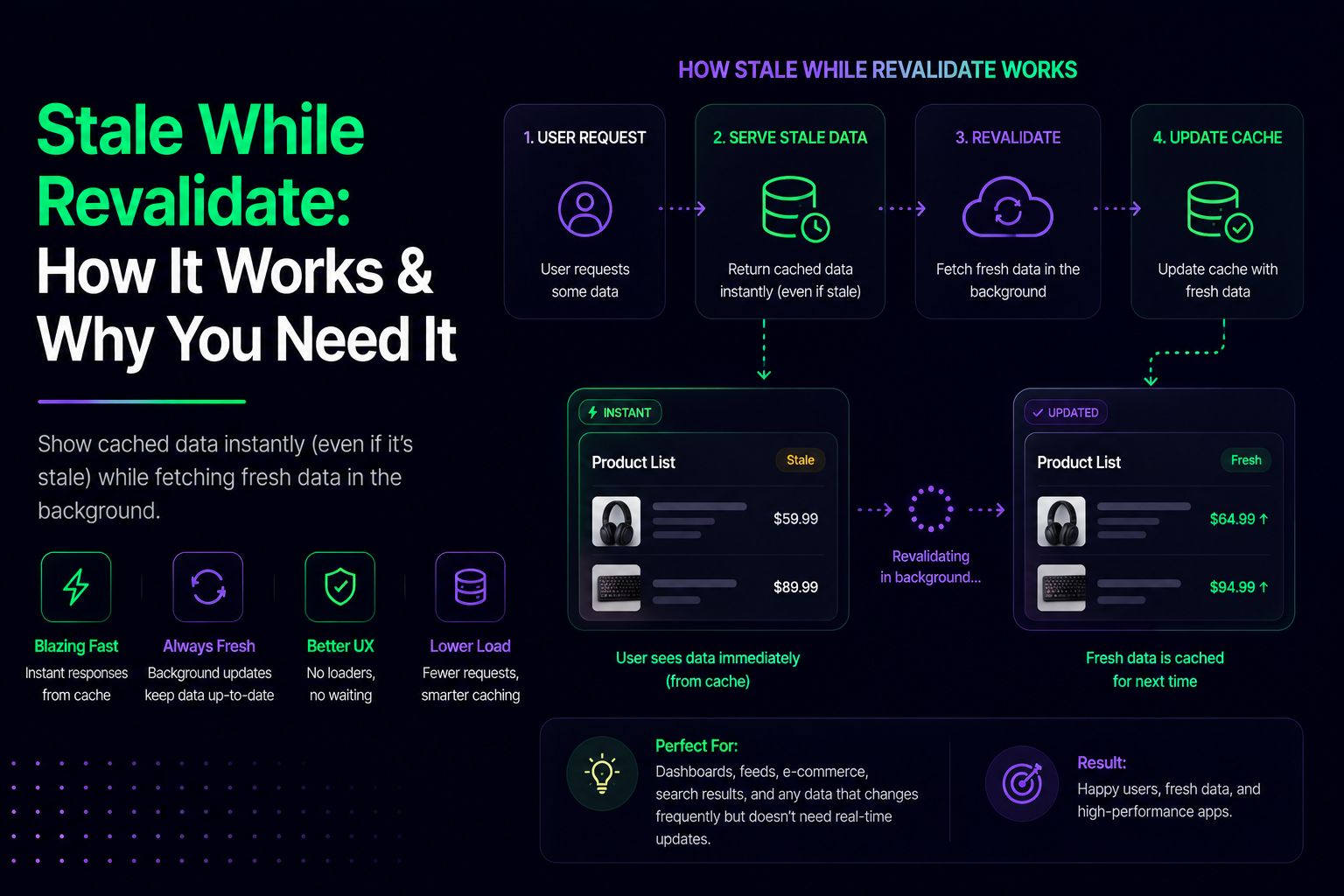
Stale While Revalidate: How It Works & Why You Need It
Modern apps face a brutal choice: show fast cached data that might be outdated, or fetch fresh data and make users wait. Stale While Revalidate (SWR) eliminates that trade-off entirely. It delivers instant responses from cache while silently refreshing content in the background—giving you both speed and freshness.
The Speed vs. Freshness Problem
Traditionally, caching forced developers to choose between blocking users while fetching fresh data or delivering cached content that might be outdated. Here's the dilemma:
- Always cache: Fast but potentially stale data frustrates users who need current information.
- Always fetch fresh: Fresh data is great, but network latency kills perceived performance.
Stale While Revalidate is an HTTP caching strategy that lets a CDN serve stale content instantly while it fetches a fresh copy from the origin in the background. The result is faster perceived performance and better user experience.
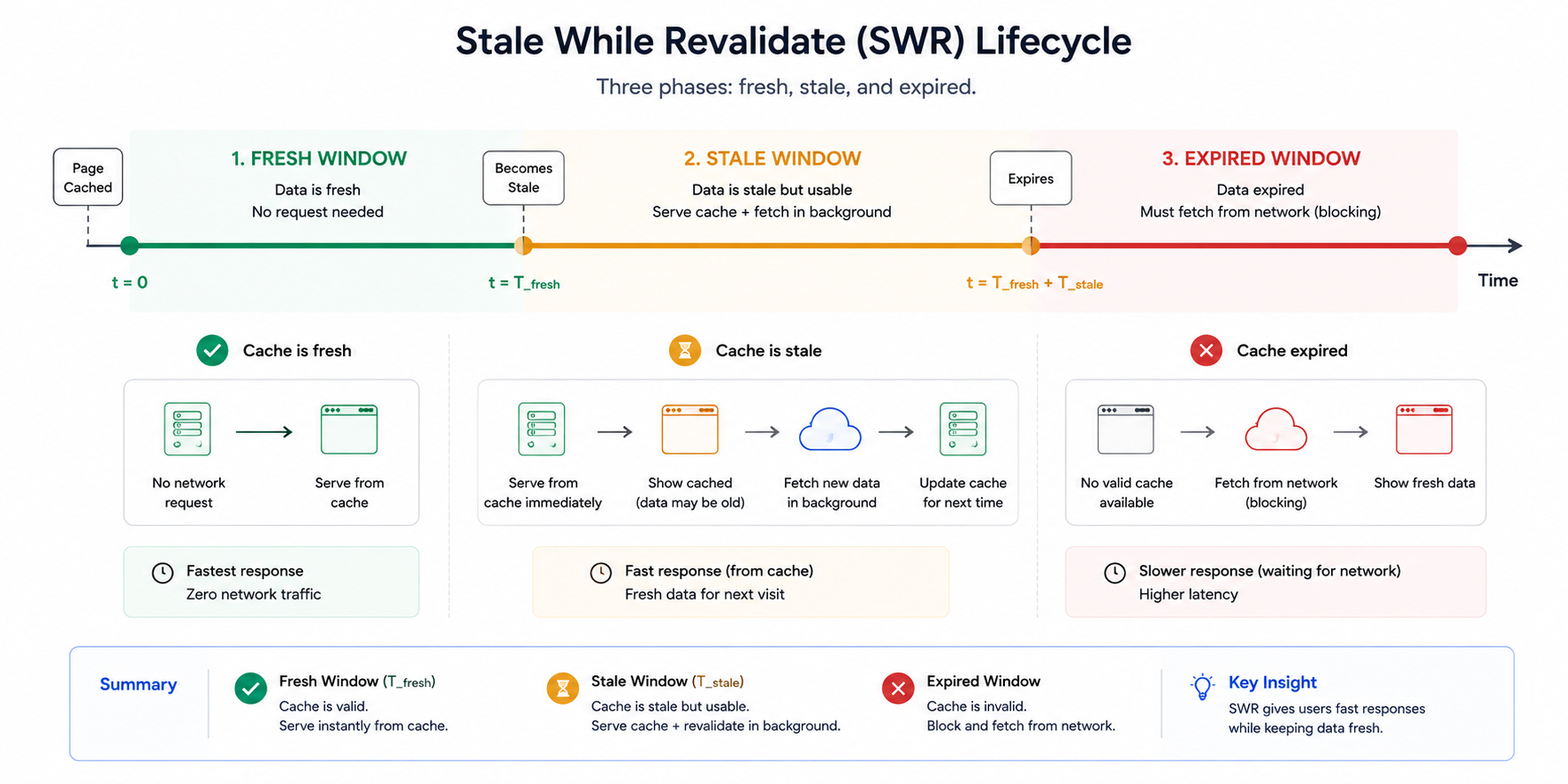
Stale while revalidate lifecycle
How It Works
To use the stale-while-revalidate caching strategy, you include two directives in the Cache-Control header: max-age and stale-while-revalidate:
Cache-Control: max-age=600, stale-while-revalidate=3600
Here's what happens:
- Fresh window (0-600 seconds): Browser serves cached content immediately, no network request.
- Stale window (600-3600 seconds): Browser serves the cached copy instantly and fetches fresh data in the background. Next request gets the updated version.
- Expired window (after 3600 seconds): Browser waits for a full network response.
This background update replaces the old file in the cache for future visits, ensuring users who return after the revalidation window get fresh content.
Real-World Applications
SWR is a great fit for slower-moving content types: API responses (user profiles, product catalogs), static assets (CSS, JavaScript, images), blog posts, or non-critical dashboards. Real examples:
- GitHub notifications: Shows your cached notification count instantly (which may be 30 seconds old) while fetching the latest count in the background.
- E-commerce dashboards: Display the last-known inventory levels immediately. While users are viewing, fresh numbers silently update in the background.
- Gmail: Renders your previously synced inbox, pulls new emails without blocking the UI.
- Social feeds: Shows posts you've already loaded while fetching new ones—no blank screens.
Users never wait—they always see something.
Implementation Options
1. HTTP Header (Easiest)
Set the Cache-Control header on your server or CDN:
Cache-Control: max-age=300, stale-while-revalidate=1800
This "hands-off" approach requires only a server configuration change and lets the browser handle cache management automatically.
2. JavaScript Libraries
For fine-grained control in frontend applications, use libraries like stale-while-revalidate-cache or SWR-inspired patterns in React/Next.js frameworks.
3. Service Workers (PWAs)
For Progressive Web Apps, you can implement the Stale-While-Revalidate strategy using the Service Worker API, giving you control over which requests use SWR and which don't.
When to Use SWR (and When Not To)
Perfect for:
- Product catalogs and inventory (slight delays acceptable)
- User dashboards and analytics
- Blog posts and static documentation
- API responses that change periodically (not real-time)
- Images and CSS/JavaScript files
Avoid for:
- Financial transactions or sensitive operations
- Real-time data (stock prices, live chat)
- Authentication or security-critical content
SWR isn't always the right choice. In those cases, blocking fetches are safer.
The Performance Impact
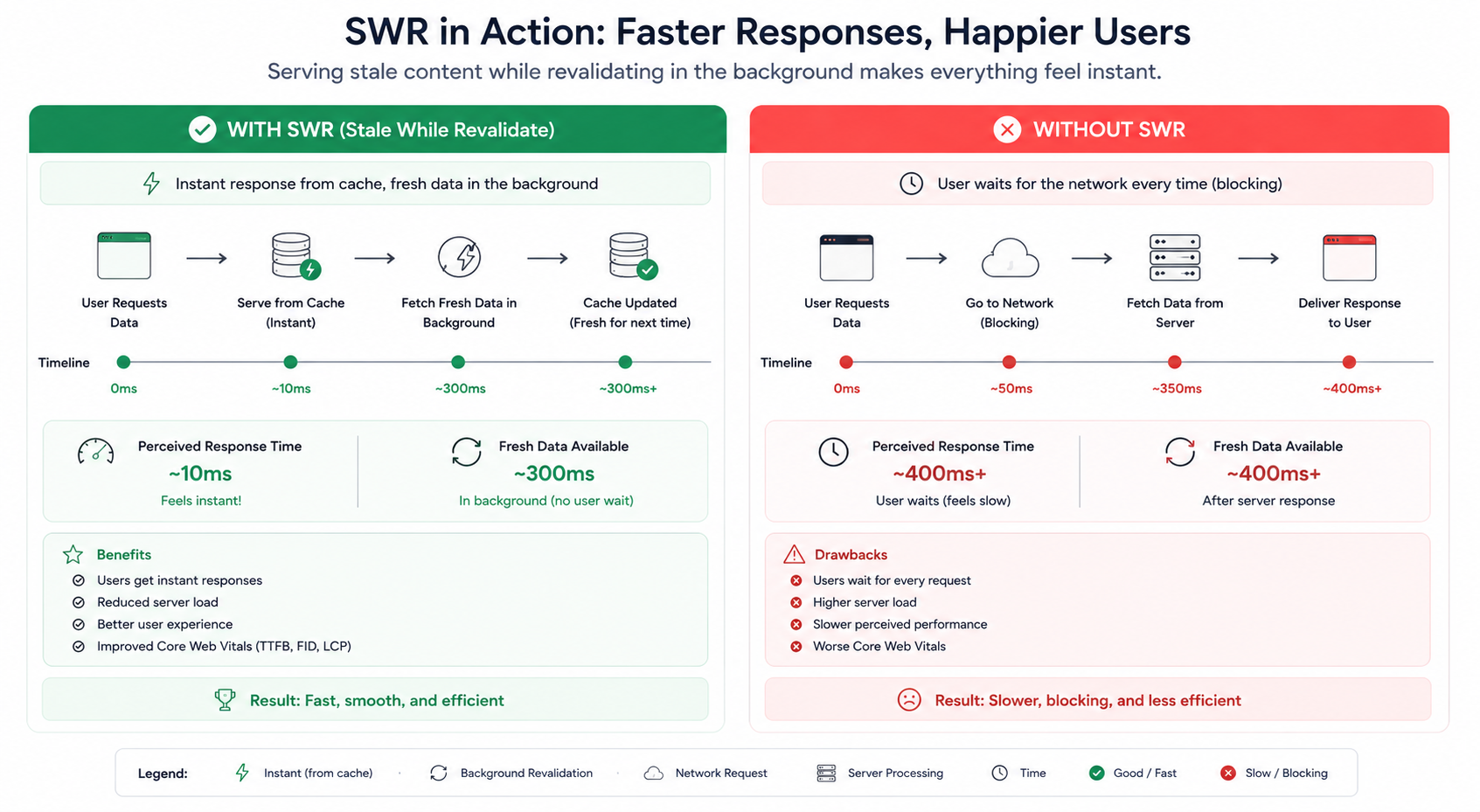
SWR reduces origin load, improves backend performance, and guarantees fast responses, preventing cache stampedes when content expires. Concrete benefits:
- Reduced server load: Fewer concurrent origin requests since most traffic hits the stale cache.
- Lower latency: Users always get an instant response.
- Better UX: Progressive updates feel natural; users don't notice quiet background refreshes.
Support for setting stale-while-revalidate alongside max-age in the Cache-Control response header is available in Chrome 75 and Firefox 68—meaning virtually all modern browsers support it.
Key Takeaway
Stale While Revalidate optimizes for human perception, not just technical correctness. It's a simple philosophy: show something now, improve it quietly. By removing the speed-versus-freshness trade-off, SWR lets you build fast, responsive apps that stay reasonably up-to-date without forcing users to wait.
Resources
- web.dev - Keeping things fresh with stale-while-revalidate — Official guide
- MDN - Cache-Control: stale-while-revalidate — HTTP specification
- rbika.com - Optimize caching with stale-while-revalidate — Technical deep dive
- DebugBear - Understanding Stale-While-Revalidate — Use cases and best practices
- Alokai - Cache-Control HTTP Header 2024 Guide — Modern caching patterns
- stale-while-revalidate-cache - npm — JavaScript implementation library
- AWS CloudFront - Stale-While-Revalidate Support — CDN implementation