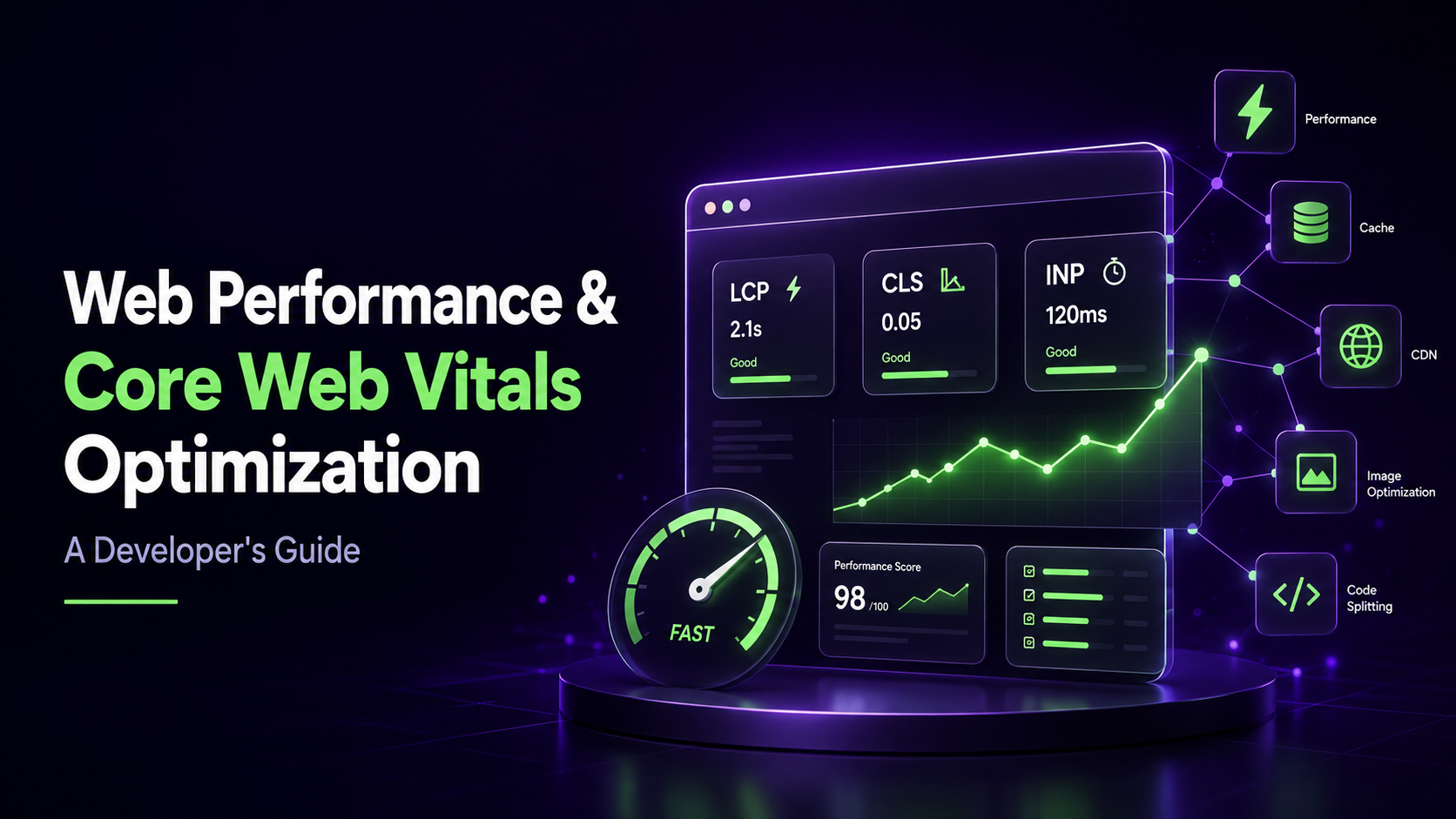
Web Performance & Core Web Vitals Optimization: A Developer's Guide
A practical, code-level guide to making pages faster, more accessible, and better scored on Core Web Vitals — organized around what actually moves the needle for real users, not just synthetic audit tools. This covers image and font delivery, accessibility, LCP/CLS/INP mechanics, unused JavaScript, hydration cost, redirects, caching, and server response time, based on hands-on production audits rather than a generic checklist.
1. Image Optimization
- Use WebP or AVIF over JPEG/PNG — better compression at equal visual quality.
- Serve the right size per screen. In Next.js, the
<Image>component handles this automatically via responsivesrcsetgeneration. - Use the framework's image component (Next.js
<Image>, or an equivalent) — it handles lazy loading, fetch priority, and width/height attributes out of the box. - Match the image's aspect ratio to its displayed size. A mismatch forces the browser to crop/resize on the fly, adding latency and hurting Cumulative Layout Shift (CLS).
- If height is unknown, use
fillmode — but wrap it in a sized container<div>to prevent layout collapse.
2. Fonts
Font loading is one of the biggest invisible contributors to CLS and delayed text paint — and one of the most commonly skipped sections in performance guides.
- Add
font-display: swap(oroptional) to every@font-face/font<link>— without it, text stays invisible until the font finishes loading (FOIT). - Preload the critical font file:
<link rel="preload" as="font" type="font/woff2" crossorigin>for your primary body/heading font. - Trim unused weights/styles. Loading four static weights when only two appear in visible content wastes payload — consider a single variable font instead.
3. Accessibility (A11y)
- Add
aria-labelto every interactive element without visible text — links, icon buttons, images. - Check color contrast against WCAG AA (4.5:1 normal text, 3:1 large text). Example failing audit:
"Background and foreground colors do not have a sufficient contrast ratio."
<p class="text-muted-foreground leading-relaxed max-w-2xl mt-4">
want to improve site performace
</p>
<section id="features" class="border-t border-border py-20 bg-[#1B2B24]">
- Ensure touch targets are ≥44×44px with adequate spacing. Example failing audit:
"Touch targets do not have sufficient size or spacing."
<button class="h-1.5 rounded-full transition-all duration-300 w-6 bg-white">
<button class="h-1.5 rounded-full transition-all duration-300 w-1.5 bg-white/30">
- Avoid using Learn More , Links or any general text in anchor tags
<a>because the page performace calculator mark them as not good practice so you must wrap them ina noun or something relevent to the content
a basic example of it would be<a> App tech</a>instead of<a>learn more</a>
4. Third-Party Scripts & Heavy Media Delivery
- Load third-party scripts (analytics, chat widgets, ad tags) with
async/defer, or in Next.js,next/scriptwithstrategy="lazyOnload"or"worker"for anything non-critical. These scripts are frequently the actual cause of a slow-feeling page — more often than your own bundle. - Offload heavy media to a CDN. If a landing page has more than ~15 images/videos, use Mux, Cloudinary, rather than serving directly from your app server.
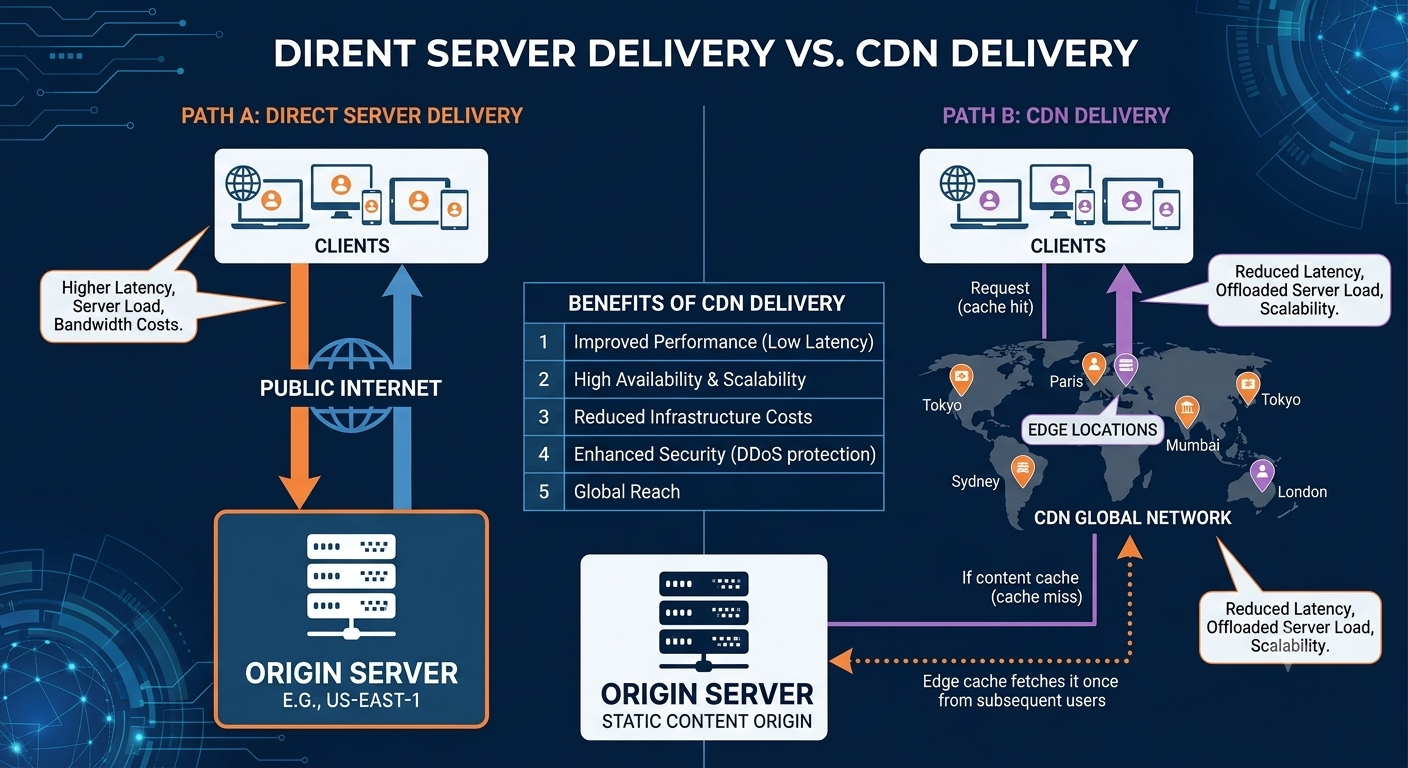
Direct server vs CDN Deveilvery
5. Largest Contentful Paint (LCP)
Real fixes first:
- Add
fetchpriority="high"(Next.js:priority) to the actual hero/LCP element — and only that one; overusing it defeats prioritization. - Preload the hero image:
<link rel="preload" as="image">. - Remove render-blocking CSS/JS ahead of the hero paint; inline critical CSS.
- If the origin server itself is slow (high TTFB), no front-end change will fix LCP — that's a backend problem.
A technique worth understanding rather than dismissing — the placeholder paint:
Some pages paint a large placeholder element (a sized background-image or block matching the hero) early, intending to "lock in" a fast LCP timestamp before the real hero content arrives.
This is not a myth — it can genuinely work, because of how LCP is measured:
- LCP only updates when a new candidate is larger than the current largest recorded one, and stops updating entirely at first user input or tab-hide web.dev: LCP definition.
- A plain
background-colordiv with no image or text isn't an LCP candidate at all — only images, video posters, elements with abackground-image, and text-containing blocks qualify MDN: Largest Contentful Paint. - If a qualifying placeholder is sized ≥ the real hero, and the real hero never exceeds it, the early paint time can become the permanently reported LCP — and this holds for real-user field data (CrUX), not just local Lighthouse runs, since both use the same
PerformanceObserverAPI (web.dev: Optimize LCP).
The tradeoff to weigh: this changes the reported number, not the actual moment the user sees real content — so it's worth treating as a deliberate metric decision (and being aware it sits close to guidelines around manipulating ranking signals) rather than a plug-and-play "fix."
6. Cumulative Layout Shift (CLS)
- Reserve space for ads, embeds, and late-loading widgets with
min-heightor aspect-ratio boxes before their content arrives. - Give every image and iframe explicit dimensions — see Section 1.
- Font loading also affects CLS, not just LCP — see Section 2.
7. Interaction to Next Paint (INP)
INP replaced FID as a Core Web Vital in March 2024 — worth calling out since a lot of older guides still only mention FID (web.dev: INP is officially a Core Web Vital).
- Break up long synchronous event handlers doing heavy work inline.
- Defer non-urgent work with idle-time scheduling instead of running it all inside the click/change handler.
- Debounce frequent input handlers and narrow re-render scope in component-heavy UIs.
8. Removing Unused JavaScript
How to detect it:
- Open the page in Chrome DevTools.
- Click the 3 dots → Coverage.
- Start recording, reload the page.
- Red bars in the report = unused code.
- Screenshot the report and feed it to an LLM for module-removal recommendations.
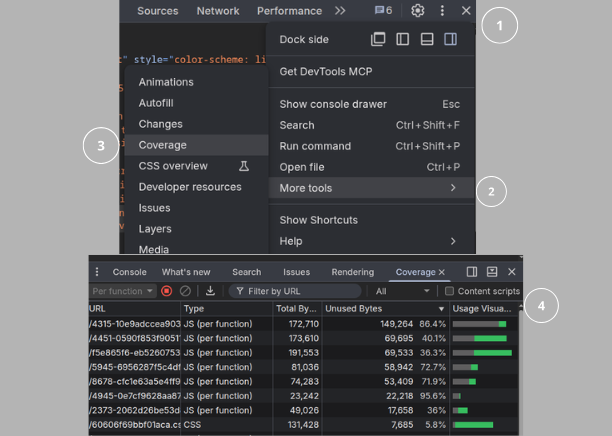
how to find unused js
Prevention:
- Avoid
import * from 'library'— import only the specific function/icon needed. - Lazy-load non-critical heavy components (animation libraries, video editors) with
<Suspense>so they load on demand, not on initial render.
Figure out why it's 86% unused two different problems, two different fixes
A. You're importing the whole library but using a fraction of it
1// culprit
2import * as Icons from 'some-icon-library'
3<Icons.ArrowRight />
4
5// fix — named import, tree-shakeable
6import { ArrowRight } from 'some-icon-library'
Check the package's package.json for "sideEffects": false — without that flag, webpack can't safely tree-shake it even with named imports, no matter how you write the import.
B. The chunk is loaded globally but only needed on one page
If it's in your shared/commons chunk (loaded on every route) but only one page actually uses it — e.g. a chart library only on /dashboard — the fix isn't tree-shaking, it's not loading it globally at all
1// instead of importing at the top of a shared layout/_app
2import HeavyChart from 'chart-library'
3
4// dynamic import scoped to the page that needs it
5import dynamic from 'next/dynamic'
6const HeavyChart = dynamic(() => import('chart-library'), { ssr: false })
This moves it out of the shared bundle entirely into a route-specific chunk that only loads when that page is visited, that's usually how you go from "95% unused across the whole site" to "0% unused, only loaded where needed."
9. Hydration Cost (component-based frameworks)
A small JS bundle doesn't guarantee a fast page — hydrating a large client-side component tree has its own cost, independent of bundle size.
- In Next.js App Router, keep static content in Server Components and hydrate only the interactive "islands."
- Watch Time to Interactive (TTI), not just bundle size, when profiling.
10. Redirects
- Avoid redirect chains on the main landing page. Each hop adds a full request-response cycle, directly hurting Core Web Vitals.
check your redirects
11. Caching & Connection Setup
- Add
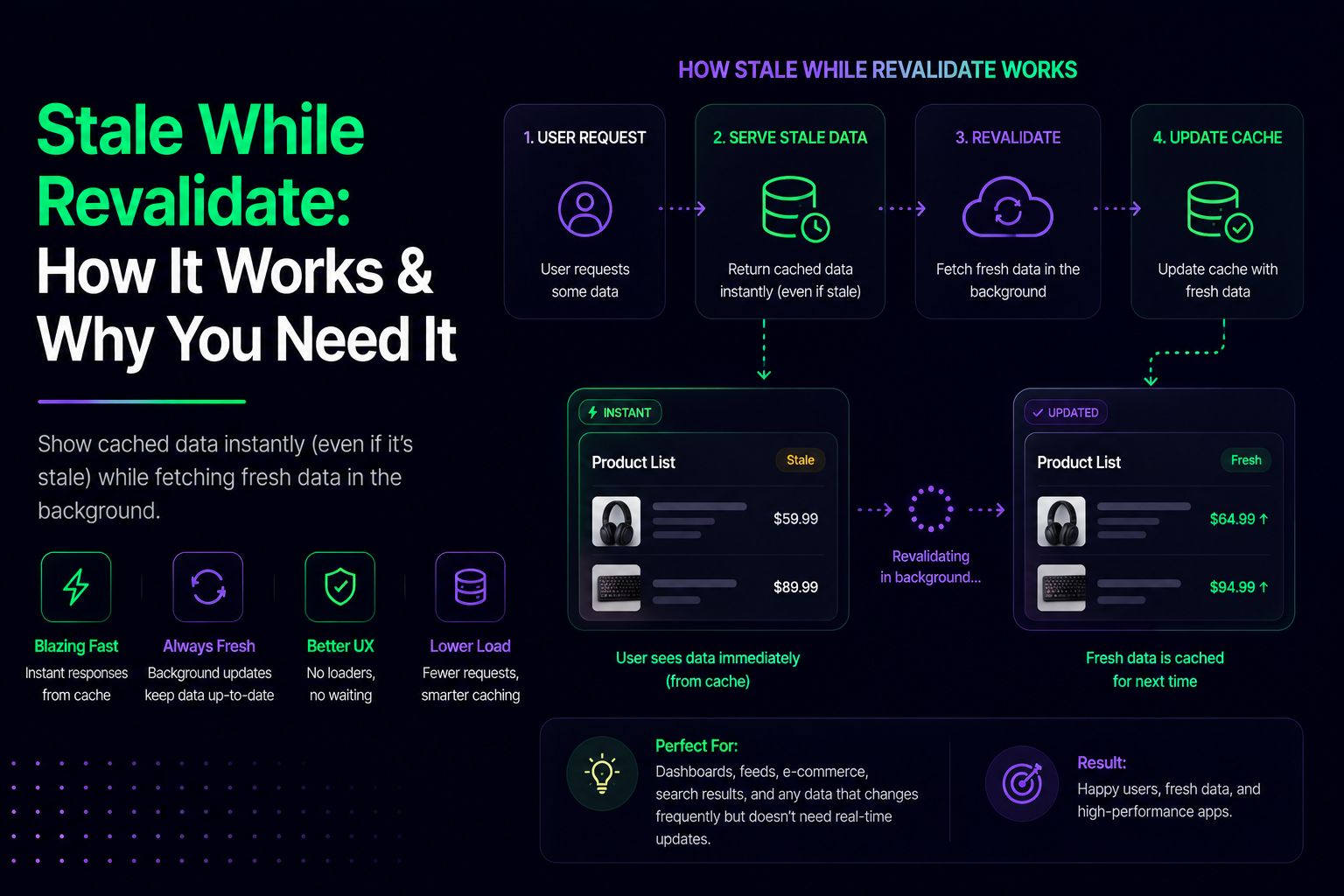
Cache-Control/stale-while-revalidateheaders to API responses feeding page content, not just static assets. - Use content-hashed filenames with long-lived cache headers for static JS/CSS/fonts.
- Add
<link rel="preconnect">for third-party origins used early on the page (font CDN, API host, analytics) — cheap, near-zero-risk win that's easy to forget.
12. Server Response Time (TTFB)
No amount of front-end optimization compensates for a slow origin server or database query. Profile actual server response time before assuming a front-end fix will help — this is the section most "page optimization" guides skip entirely because it isn't a client-side fix.
13. Agentic Browsing (emerging area)
As AI agents increasingly navigate and act on pages on a user's behalf, a newer consideration is whether a page is easy for an agent to parse and interact with correctly:
- Semantic HTML and clear landmark structure help agents identify page regions correctly, the same way they help screen readers.
- Structured data (schema.org, well-formed metadata) gives agents unambiguous signals about page content and available actions.
- Predictable, accessible form and button labeling matters doubly here — the same
aria-labelwork from Section 3 also makes a page more reliably operable by an automated agent.
Add an llms.txt file(next). Where robots.txt controls what crawlers may access, llms.txt is a markdown file at your site root (/llms.txt) that tells an LLM/agent what your site actually contains, curated rather than crawled — closer to a table of contents than a policy file. The llmstxt.org spec defines a strict section order:
- H1 — site/project name. The only required section.
- Blockquote — a 1-3 sentence summary. Must carry the key info an agent needs to understand the rest of the file on its own.
- Optional free-text section(s) (paragraphs/lists, no headings) — extended context, audience, usage notes.
- H2 sections with markdown link lists — group your real pages by category (e.g.
## Docs,## Product,## Pricing). Each entry:[Page Title](URL): short description. - An
## OptionalH2 for secondary links an agent can skip if it's context-constrained.
1# YourProduct
2
3> YourProduct is a [one-line description of what it does and for whom].
4
5Built for [audience]. API and docs are versioned; unstated defaults follow the latest stable release.
6
7## Docs
8- [Getting Started](https://yoursite.com/docs/getting-started): install and first-run walkthrough
9- [API Reference](https://yoursite.com/docs/api): full endpoint and parameter reference
10
11## Product
12- [Pricing](https://yoursite.com/pricing): plans and limits
13- [Features](https://yoursite.com/features): full feature list
14
15## Optional
16- [Blog](https://yoursite.com/blog): release notes and long-form posts
17- [Changelog](https://yoursite.com/changelog): version history
For larger/documentation-heavy sites, the spec also allows an /llms-full.txt the full plain-text content of every page referenced in llms.txt, concatenated, so an agent can pull the whole site's context in one request instead of fetching page by page. Curate this to your 30-100 most important pages rather than trying to include everything; an unfiltered dump defeats the purpose.
This area is still developing, so treat it as directional rather than a fixed checklist.
Quick Reference Checklist
| Category | Action Item |
|---|---|
| Images | WebP/AVIF, correct aspect ratio, framework <Image> component |
| Fonts | font-display: swap, preload critical woff2, trim unused weights |
| Accessibility | aria-label on interactive elements, contrast ≥ 4.5:1, touch targets ≥ 44×44px |
| Third-party/Media | async/defer scripts, CDN for >15 heavy assets |
| LCP | fetchpriority/preload real hero; understand the placeholder trick's tradeoffs |
| CLS | Reserve space for late content, explicit media dimensions |
| INP | Break up long handlers, defer non-urgent work |
| JS | Coverage audit, targeted imports, lazy-load with Suspense |
| Hydration | Server Components for static content, hydrate only interactive islands |
| Redirects | Eliminate chains on the main entry route |
| Caching | Cache headers on API + static assets, preconnect for third-party origins |
| TTFB | Profile server/database response time directly |
| Agentic browsing | Semantic HTML, structured data, clear labeling |